OpenCode Integration
Using OpenCode open-source terminal AI coding assistant with QCode API
OpenCode Integration
⚠️ Important: API Direct Access Permission Required
Using OpenCode requires enabling API direct access permission. Since direct API calls don't have Claude Code's session mechanism, token consumption will be higher, so this permission is disabled by default.
To enable it, please contact our online support or email hi@qcode.cc, and we'll activate this permission for your purchased API Key.
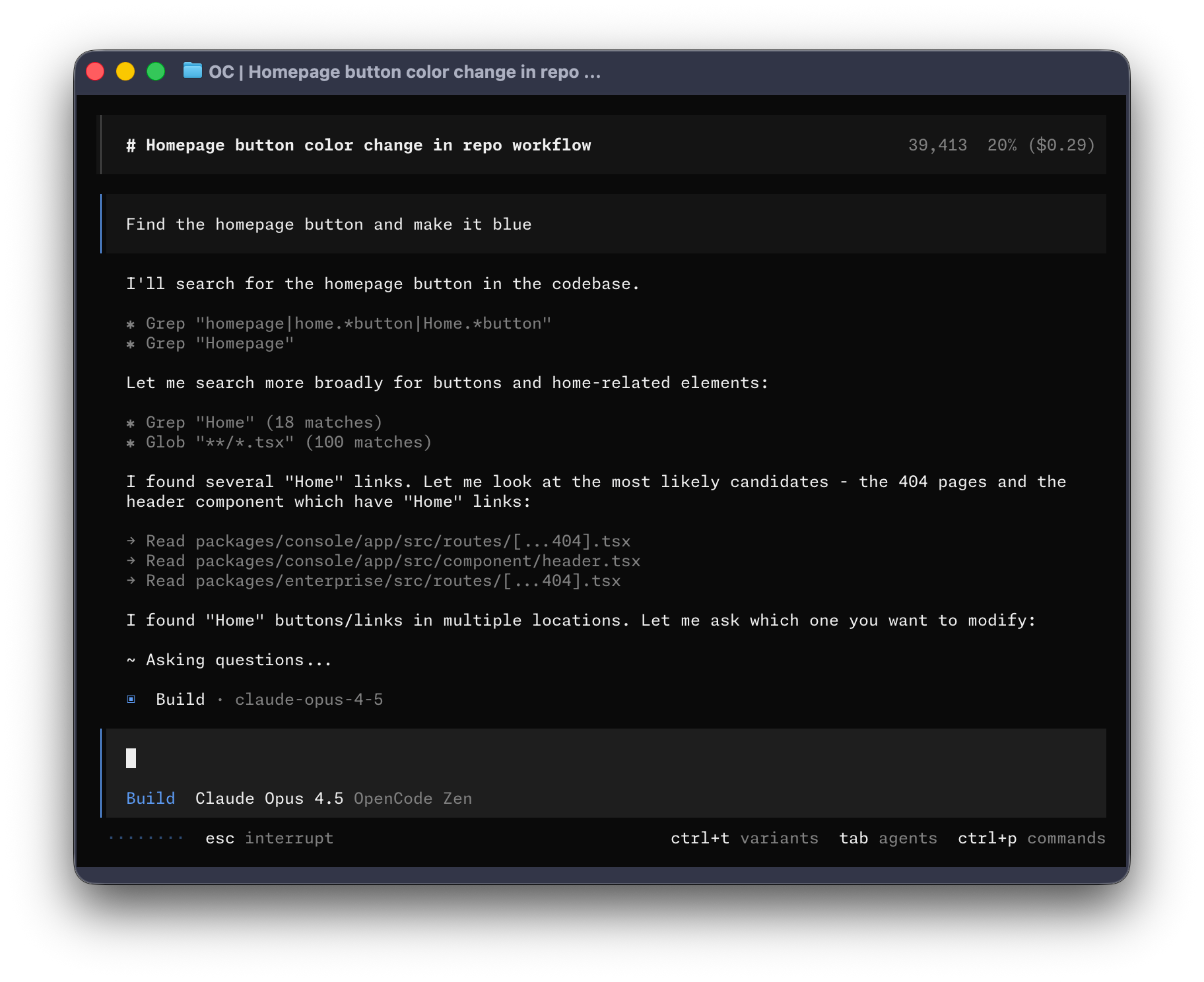
OpenCode is a 100% open-source terminal AI coding assistant, similar to Claude Code but with more flexibility and customization options. It supports multi-model switching, LSP integration, TUI interface, and is not tied to any specific AI provider.
Project Introduction
OpenCode
OpenCode is an open-source AI coding agent developed by the SST team. Key features include:
- 100% Open Source - MIT license, fully transparent
- Multi-Model Support - Use Claude, OpenAI, Google Gemini, and more simultaneously
- Native LSP Support - Built-in Language Server Protocol for intelligent code analysis
- TUI First - Designed for terminal users, built by Neovim enthusiasts
- Client/Server Architecture - Run the server locally and control remotely from mobile devices
- Dual Built-in Agents -
build(default, full access) andplan(read-only, for analysis and planning)
Project Stats (as of January 2026): - GitHub Stars: 46.1k+ - Contributors: 490+ - Version: v1.0.223+
oh-my-opencode
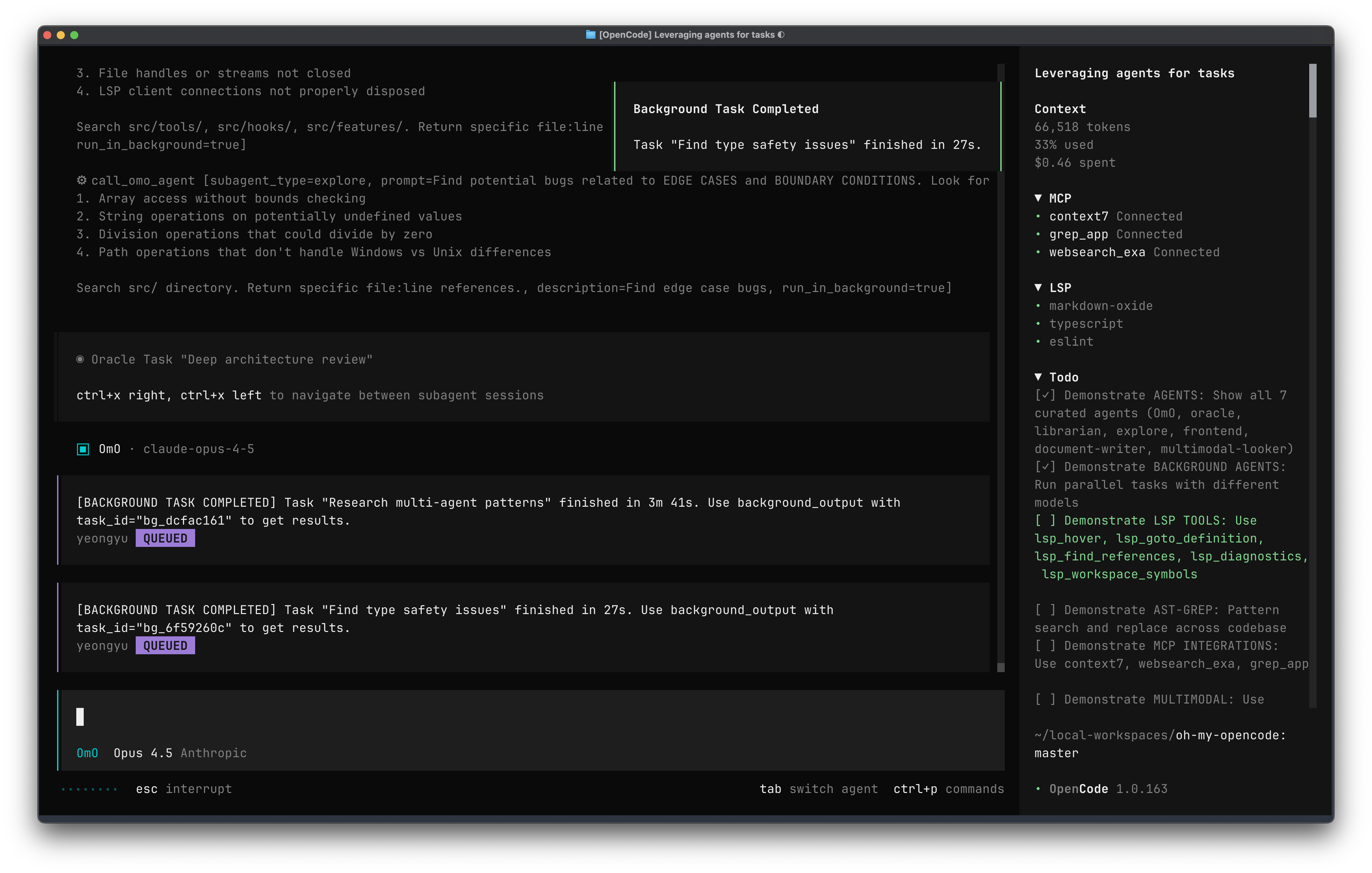
oh-my-opencode is an enhancement plugin for OpenCode, often called "OpenCode on steroids", providing a professional-grade AI coding experience:
Core Features:
- Async Subagents - Parallel task processing capability similar to Claude Code
- Curated Agent Configurations - Pre-configured professional agent roles (Oracle, Librarian, Explore, etc.)
- LSP/AST Tools - Intelligent refactoring, code analysis, symbol search, and more
- Claude Code Compatibility Layer - Supports Claude Code hooks, commands, and skills configurations
- Sisyphus Main Agent - Powerful orchestration agent based on Claude Opus 4.5 with background parallel tasks
- ultrawork Mode - Just add
ultraworkto your prompt to enable the most powerful parallel orchestration mode
Built-in Agent Roles:
| Agent Name | Model | Purpose |
|---|---|---|
| Sisyphus | Claude Opus 4.5 | Main orchestrator, plans and delegates tasks |
| Oracle | GPT 5.2 | Architecture design, code review, strategy analysis |
| Librarian | Claude Sonnet 4.5 | Multi-repo analysis, doc lookup, implementation examples |
| Explore | Grok Code | Fast codebase exploration and pattern matching |
| Frontend UI/UX | Gemini 3 Pro | Frontend development, excels at creating beautiful UIs |
Installation & Configuration
Step 1: Install OpenCode
OpenCode iterates rapidly, please refer to the official installation guide:
Official Documentation: https://opencode.ai/docs
Common installation methods:
# Install with curl (recommended)
curl -fsSL https://opencode.ai/install | bash

# Using package managers
npm install -g opencode  # or bun/pnpm/yarn

# macOS Homebrew
brew install opencode
Step 2: Install oh-my-opencode (Recommended)
oh-my-opencode provides professional out-of-the-box configurations, highly recommended:
bunx oh-my-opencode install
Official Documentation: https://github.com/code-yeongyu/oh-my-opencode
Tip: During installation, you'll be asked which AI subscriptions you have (Claude, ChatGPT, Gemini). Select based on your actual subscriptions.
Step 3: Configure QCode API
This is the key step! Create or edit the configuration file ~/.config/opencode/opencode.json:
About Model Selection: The configuration below uses Claude series and GPT Codex series models provided by QCode. We recommend combining these two model families for development, as they excel in various coding benchmarks. We don't sell Gemini or Grok models. If you need them, you can refer to the configuration format below to set up other providers (though we don't recommend it, as Gemini and Grok underperform compared to Claude and Codex in coding benchmarks).
{
  "$schema": "https://opencode.ai/config.json",

  "provider": {
    "anthropic": {
      "options": {
        "baseURL": "https://asia.qcode.cc/claude/v1"
      }
    },
    "openai": {
      "options": {
        "baseURL": "https://asia.qcode.cc/openai"
      }
    }
  },

  "model": "anthropic/claude-opus-4-5-20251101",
  "small_model": "anthropic/claude-haiku-4-5-20251001",
  "default_agent": "build",

  "permission": {
    "read": "allow",
    "list": "allow",
    "glob": "allow",
    "grep": "allow",
    "codesearch": "allow",
    "lsp": "allow",

    "edit": "ask",
    "bash": "ask",
    "webfetch": "ask",
    "websearch": "ask",

    "external_directory": "deny",
    "doom_loop": "ask"
  },

  "agent": {
    "plan": {
      "mode": "primary",
      "description": "Planning/decomposition/technical design (read-only, avoid accidental code changes)",
      "model": "anthropic/claude-opus-4-5-20251101",
      "temperature": 0.1,
      "prompt": "You are a senior technical lead. Goal: break down requirements into executable steps (with acceptance criteria/risks/rollback). Read-only by default, do not modify files or run commands; if execution is truly needed, explain the reason and suggest switching to build/codex.",
      "permission": {
        "read": "allow",
        "list": "allow",
        "glob": "allow",
        "grep": "allow",
        "codesearch": "allow",
        "lsp": "allow",
        "edit": "deny",
        "bash": "deny",
        "webfetch": "deny",
        "websearch": "deny",
        "external_directory": "deny",
        "doom_loop": "deny"
      }
    },

    "build": {
      "mode": "primary",
      "description": "Main development (end-to-end implementation/debugging/fixing tests) - Claude Opus 4.5",
      "model": "anthropic/claude-opus-4-5-20251101",
      "temperature": 0.2,
      "prompt": "You are the main software engineering agent. Priorities: minimal viable changes, readability, testability. Before making changes, briefly explain the approach; after changes, always provide: key diff points, how to verify locally (commands), potential edge cases.",
      "permission": {
        "read": "allow",
        "list": "allow",
        "glob": "allow",
        "grep": "allow",
        "codesearch": "allow",
        "lsp": "allow",
        "edit": "allow",
        "bash": "allow",
        "webfetch": "ask",
        "websearch": "ask",
        "external_directory": "deny",
        "doom_loop": "ask"
      }
    },

    "codex": {
      "mode": "primary",
      "description": "Refactoring/migration/major changes (Codex) - GPT-5.2",
      "model": "openai/gpt-5.2-2025-12-11",
      "temperature": 0.2,
      "prompt": "You are a Codex-style engineering agent, skilled in large-scale refactoring, migration, code review, and complex toolchain collaboration. Priority: keep the project runnable: step-by-step commits, each step verifiable; when uncertain, add safeguards and tests first.",
      "permission": {
        "read": "allow",
        "list": "allow",
        "glob": "allow",
        "grep": "allow",
        "codesearch": "allow",
        "lsp": "allow",
        "edit": "allow",
        "bash": "allow",
        "webfetch": "ask",
        "websearch": "ask",
        "external_directory": "deny",
        "doom_loop": "ask"
      }
    },

    "review": {
      "mode": "subagent",
      "description": "Code review/second brain (read-only) - GPT-5.1-Codex-Max",
      "model": "openai/gpt-5.1-codex-max",
      "temperature": 0.1,
      "prompt": "You are a strict code reviewer. Output: 1) Key risks (bugs/security/concurrency/edge cases) 2) Maintainability suggestions 3) Minimal modification suggestions (can use pseudo diff) 4) Necessary test points. Read-only by default, do not modify files/run commands.",
      "permission": {
        "read": "allow",
        "list": "allow",
        "glob": "allow",
        "grep": "allow",
        "codesearch": "allow",
        "lsp": "allow",
        "edit": "deny",
        "bash": "deny",
        "webfetch": "deny",
        "websearch": "deny",
        "external_directory": "deny",
        "doom_loop": "deny"
      }
    },

    "explore": {
      "mode": "subagent",
      "description": "Quick code scan/file location/context summary (read-only) - Claude Haiku 4.5",
      "model": "anthropic/claude-haiku-4-5-20251001",
      "temperature": 0.1,
      "prompt": "You are a quick exploration subagent: locate relevant files/functions/call chains with minimal steps, provide clear paths and summaries. Read-only by default, do not modify files/run commands.",
      "permission": {
        "read": "allow",
        "list": "allow",
        "glob": "allow",
        "grep": "allow",
        "codesearch": "allow",
        "lsp": "allow",
        "edit": "deny",
        "bash": "deny",
        "webfetch": "deny",
        "websearch": "deny",
        "external_directory": "deny",
        "doom_loop": "deny"
      }
    },

    "general": {
      "mode": "subagent",
      "description": "General research/documentation/comparing approaches (medium cost) - Claude Sonnet 4.5",
      "model": "anthropic/claude-sonnet-4-5-20250929",
      "temperature": 0.2,
      "prompt": "You are a general analysis subagent: focus on explanation, trade-offs, documentation, and approach comparison; read-only by default, try not to modify code.",
      "permission": {
        "read": "allow",
        "list": "allow",
        "glob": "allow",
        "grep": "allow",
        "codesearch": "allow",
        "lsp": "allow",
        "edit": "deny",
        "bash": "deny",
        "webfetch": "ask",
        "websearch": "ask",
        "external_directory": "deny",
        "doom_loop": "deny"
      }
    },

    "think": {
      "mode": "subagent",
      "description": "Assist thinking/edge case reasoning (read-only) - GPT-5.2",
      "model": "openai/gpt-5.2-2025-12-11",
      "temperature": 0.2,
      "prompt": "You are a reasoning and edge case analysis subagent: provide structured analysis and suggestions for design, exception paths, concurrency/consistency, performance bottlenecks. Read-only by default.",
      "permission": {
        "read": "allow",
        "list": "allow",
        "glob": "allow",
        "grep": "allow",
        "codesearch": "allow",
        "lsp": "allow",
        "edit": "deny",
        "bash": "deny",
        "webfetch": "deny",
        "websearch": "deny",
        "external_directory": "deny",
        "doom_loop": "deny"
      }
    }
  }
}
API Endpoint Selection
Based on your network situation, you can modify the baseURL in the provider configuration:
| Endpoint | Anthropic (Claude) | OpenAI (Codex) | Use Case |
|---|---|---|---|
| Domain (Recommended) | https://asia.qcode.cc/claude/v1 |
https://asia.qcode.cc/openai |
Global users, auto-selects optimal node |
| Hong Kong IP Direct | http://103.218.243.5/claude/v1 |
http://103.218.243.5/openai |
Alternative for users in China |
| Shenzhen IP Direct | http://103.236.53.153/claude/v1 |
http://103.236.53.153/openai |
Recommended for mainland China users |
For China Mainland Users: For best performance, change
baseURLtohttp://103.236.53.153/claude/v1andhttp://103.236.53.153/openai.
Available Models
QCode currently supports these popular models:
Claude Series (path: /claude/v1):
- claude-sonnet-4-5-20250929 - Sonnet 4.5, best value
- claude-opus-4-5-20251101 - Opus 4.5, strongest reasoning
- claude-haiku-4-5-20251001 - Haiku 4.5, ultra-fast response
OpenAI/Codex Series (path: /openai):
- gpt-5.2-2025-12-11 - GPT 5.2 latest (recommended)
- gpt-5.1-codex-max - Codex Max, specialized for coding
- gpt-5.1-codex - Codex standard
Configuration Overview
The above configuration includes a complete multi-agent workflow:
| Agent | Model | Mode | Purpose |
|---|---|---|---|
| plan | Claude Opus 4.5 | primary | Planning/decomposition/technical design (read-only) |
| build | Claude Opus 4.5 | primary | Main development, end-to-end implementation |
| codex | GPT-5.2 | primary | Refactoring/migration/major changes |
| review | GPT-5.1-Codex-Max | subagent | Code review (read-only) |
| explore | Claude Haiku 4.5 | subagent | Quick code scan/file location (read-only) |
| general | Claude Sonnet 4.5 | subagent | General research/documentation (read-only) |
| think | GPT-5.2 | subagent | Assist thinking/edge case reasoning (read-only) |
You can customize each agent's model, prompt, and permission settings according to your preferences.
Step 4: Configure API Key
After opening OpenCode, use the /connect command to configure your API Key:
Configure Anthropic (Claude)
- Type
/connectin OpenCode - Select Anthropic
- Select Manually enter API Key
- Enter the API Key you purchased from QCode
- Press Enter to save
Configure OpenAI (Codex)
- Type
/connect - Select OpenAI
- Select Manually enter API Key
- Enter the API Key you purchased from QCode
- Press Enter to save
Save and Restart
After configuration:
- Type
/exitto exit OpenCode - Reopen OpenCode
Your API Keys are saved in ~/.local/share/opencode/auth.json and can be edited directly for future adjustments.
Verify Configuration
After reopening OpenCode, verify your configuration by testing:
# Start OpenCode
opencode

# Test in OpenCode
> Hello, please introduce yourself
If the conversation works normally, your configuration is successful!
Usage Tips
ultrawork Mode
If you have oh-my-opencode installed, just add ultrawork or ulw to your prompt to enable the most powerful parallel multi-model orchestration mode:
ultrawork Help me refactor the authentication module of this project
Background Tasks
Use the @ syntax to call specialized agents for specific tasks:
@oracle Review the architecture design of this code
@librarian Find similar open-source implementations
@explore Search for all API endpoints in the project
Tab to Switch Agents
Press Tab to switch between build and plan agents:
- build - Full permissions, for development work
- plan - Read-only mode, for analysis and planning
Troubleshooting
API Connection Failed
- Check if the API endpoint configuration is correct
- Confirm the API Key is saved correctly
- Try switching to another API endpoint (e.g., Shenzhen direct connection)
- Check if your network requires a proxy
Model Not Available
Ensure the model definition is correctly configured in opencode.json and the model ID matches QCode's supported model names.
oh-my-opencode Configuration Issues
Refer to the official documentation: https://github.com/code-yeongyu/oh-my-opencode#configuration
Related Links
Next Steps
- Check VS Code Integration for IDE usage
- Explore Codex Integration to use OpenAI Codex models
- Learn CLI Tips to improve terminal efficiency